
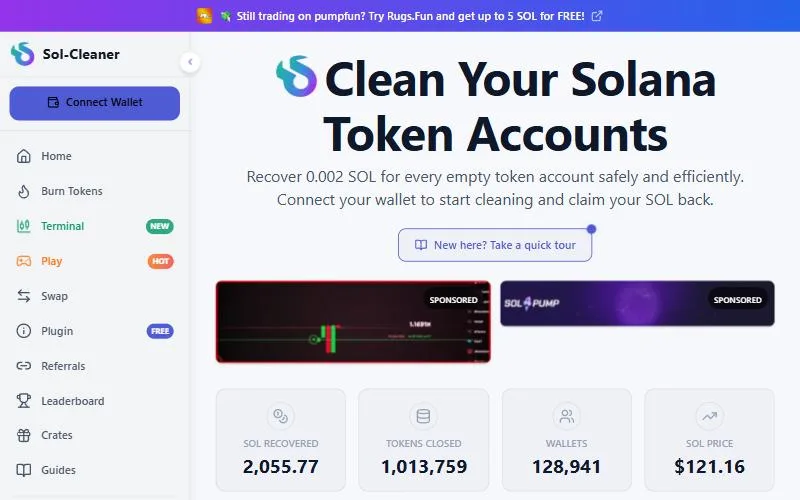
Sol-Cleaner is a Solana wallet cleaner that closes empty token accounts, burns unwanted SPL tokens and now includes a trading terminal. It scores 5.5/10 because it doesn't publish its fee, launch date, team or any audit on its own pages. It sits at #2 in our editors' order for its mix of one-click cleanup and a terminal, not because of its score. If a published fee matters to you, Sol Incinerator is the safer default.
Risk notice: Crypto trading is high risk and memecoins can go to zero in minutes. Trading bots use hot wallets. This page is not financial advice; only trade what you can afford to lose.
Before you connect a wallet anywhere, check what's there with our read-only SOL reclaim estimator. It counts empty token accounts and estimates the rent you could get back without connecting a wallet. That number is also your benchmark for what Sol-Cleaner should return.

What Sol-Cleaner is
Every token account on Solana holds a refundable rent deposit, and selling a token usually leaves its account open and empty. Closing it returns "all of its lamports, including its refundable minimum storage balance" (Solana docs). A legacy token account holds about 0.00204 SOL; see Solana rent explained.
Sol-Cleaner calls itself "a tool for cleaning unused accounts in your Solana wallet." Its pages say it helps you "review unused token accounts, close eligible accounts, burn unwanted SPL tokens, and recover SOL rent," with "simple one-click cleaning." It stresses user control: "You approve every wallet transaction yourself."
It has also launched a Sol-Cleaner trading terminal with "Buy & sell tokens in one click," "Real-time TradingView charts built in," and the line "Trade securely with your own wallet — we never touch your keys!" (Sol-Cleaner). We did not trade on the terminal and don't rate it as a trading bot; for that, see our Solana trading bot ranking.
Sol-Cleaner fees
Sol-Cleaner does not publish its fee. We checked its home page, about page, burn page, FAQ and terms on September 26, 2026 and found no percentage or fee schedule.
Competitors don't agree on the number, and neither figure is confirmed:
- Sol Incinerator's July 2026 comparison says Sol-Cleaner's FAQ "advertises a flat 5% fee," returning about 0.00194 SOL per account.
- RefundYourSOL's March 2026 fee table lists Sol-Cleaner at "~14%."
Both come from rivals, so treat them as unverified. In practice: before you sign, compare the SOL your wallet preview says you'll receive with the estimate from our read-only tool. For reference, Sol Incinerator and Unclaimed SOL publish about 2%.
Features
| Feature | Supported? | Source |
|---|---|---|
| Close empty token accounts | Yes | About |
| Burn unwanted SPL tokens | Yes | Burn page |
| One-click (batch) cleaning | Yes, "simple one-click cleaning" | Sol-Cleaner |
| Trading terminal | Yes | About |
| NFT or cNFT burns | Not documented | — |
| Token-2022 accounts | Not documented | — |
| Zero-SOL wallets | Not documented | — |
Sol Incinerator's comparison also says Sol-Cleaner "does not advertise support for Token-2022 accounts, NFT or pNFT burning, compressed NFTs, LP tokens, or domain names," which matches what we found. If your wallet is full of spam NFTs or Token-2022 accounts, a tool that documents them is a better fit.
How to use Sol-Cleaner safely, step by step
Sol-Cleaner doesn't publish a detailed walkthrough, so these steps follow the flow its pages describe (review accounts, close, burn, approve in your wallet) plus standard safety checks:
- Estimate first. Paste your public address into the SOL reclaim estimator and note the number.
- Type sol-cleaner.com yourself, with the hyphen, or use a bookmark. Don't follow links from DMs, replies, ads or token names.
- Use a burner or low-value wallet first. With no public audit, a small test is worth the extra minute.
- Connect your wallet. A real cleaner only asks you to connect and sign. Never enter a seed phrase or private key.
- Review the unused accounts it lists. Close empty accounts first; leave burning for later.
- Read the transaction in your wallet before approving. It should close accounts and send SOL to your address. Check the amount against your estimate. Reject anything that sends tokens or SOL elsewhere or changes an account's owner or authority.
- Burn only what you've identified. Burning SPL tokens is permanent. Never burn tokens a trading bot is still holding.
- Verify on an explorer that the SOL arrived.
The same flow, plus the free spl-token CLI method, is in how to reclaim SOL. Cleaning a Trojan, BONKbot or Axiom wallet? Read how to reclaim SOL from trading bots first.
Is Sol-Cleaner safe? Track record
What we could verify: it describes itself as self-custodial and says you approve every transaction. Closing an account only works when its token balance is zero (Solana docs), so close-only use can't touch tokens you still hold.
What we couldn't find:
- Launch date and team. Neither appears on its pages; its terms name only "Sol-Cleaner." It posts on X as @Sol__Cleaner.
- Audit or open source. None disclosed.
- Usage figures. Sol Incinerator's comparison says Sol-Cleaner "claims 50,000+ users"; we did not find that figure on Sol-Cleaner's own pages.
Incidents and clones. We found no reported exploit of sol-cleaner.com and no security-firm report of a drainer clone of its domain as of September 26, 2026. Reclaim tools are still a favorite disguise for drainers: PCrisk has documented fake reclaim sites that drain wallets on connection (PCrisk). Other sites use similar names, such as solana-cleaner.com, which is a separate service. Make sure you're on sol-cleaner.com.
Pros and cons
Pros
- Closes empty token accounts and burns unwanted SPL tokens
- One-click cleaning; you approve every transaction in your wallet
- Also offers a Sol-Cleaner trading terminal
Cons
- Fee not published on its site (competitors claim 5% or about 14%; unverified)
- No launch date, team or audit disclosed
- NFT and Token-2022 support not documented
Sol-Cleaner vs other reclaim tools
| Tool | Fee on empty accounts | Burns | Extras | Live since | Audit |
|---|---|---|---|---|---|
| Sol-Cleaner | Not published | SPL tokens | Trading terminal | Not stated | None disclosed |
| Sol Incinerator | ~2% | Tokens, NFTs, cNFTs, LP, domains | Fee advance for zero-SOL wallets | Dec 2021 | None public |
| RefundYourSOL | 15% default (as low as 1.85% matched) | Tokens, NFTs, Safety Burns | Fee Payer mode | 2025 | None public |
| Claim Your Sol | 5% | Tokens, NFTs | Public claim ledger | Jan 2023 | None disclosed |
Fees checked September 26, 2026 on each tool's own site. Also reviewed: Your Free SOL and Unclaimed SOL. The full list is in the best SOL reclaim tools and Sol Incinerator alternatives; the order there is our editors' pick, not a sort by score.
Who Sol-Cleaner is for
Good fit:
- You want wallet cleanup and a simple trading terminal on one site.
- Your wallet mostly has empty SPL token accounts and some unwanted tokens.
- You're comfortable checking the payout in your wallet preview before you sign.
Look elsewhere if:
- You want a published fee: Sol Incinerator or Unclaimed SOL (both about 2%).
- You need NFT, cNFT or Token-2022 cleanup, which Sol-Cleaner doesn't document.
- Your wallet holds zero SOL: RefundYourSOL and Sol Incinerator both cover network fees.
Verdict
Sol-Cleaner does the core job, closing empty accounts and burning unwanted SPL tokens, and adds a trading terminal most reclaim tools lack. But with no published fee, launch date, team or audit, you have to trust the numbers in your wallet preview. Test with a small wallet, compare the payout to your estimate, and pick a tool with a published fee if that matters more to you.
We did not connect wallets to Sol-Cleaner; facts come from its own pages and the sources linked, checked September 26, 2026. We earn a commission if you sign up through some links on this page.


